가위, 바위, 보 개인 미니 프로젝트(걸린 시간 4일)
2025. 7. 7. 18:19ㆍ프로젝트/가위,바위,보 프로젝트(미니) - JAVASCRIPT
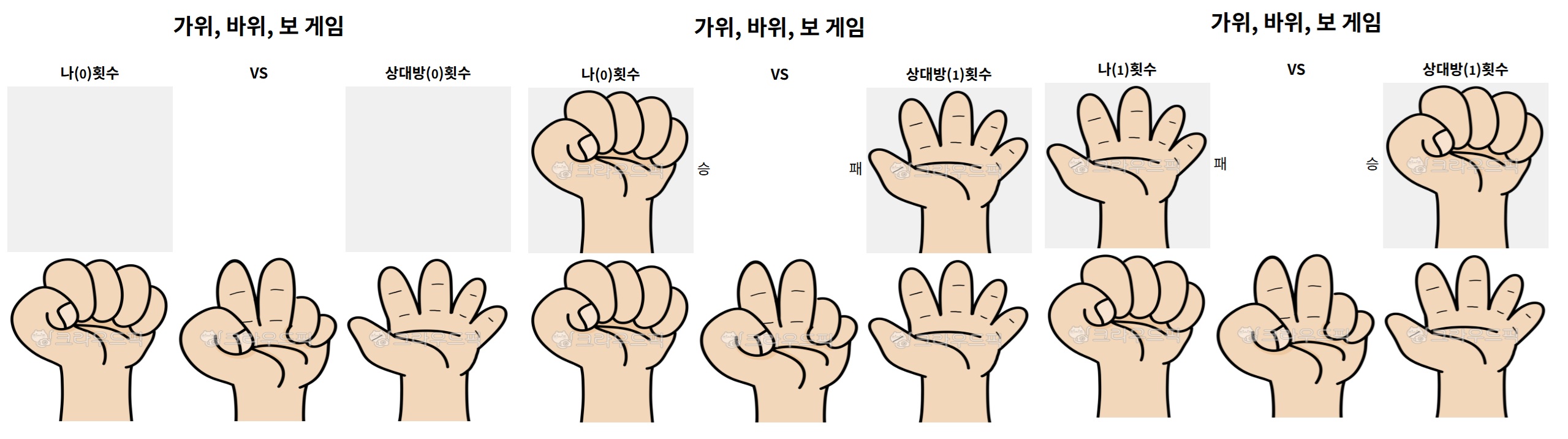
<javascript>
let meNumber = 0;
let youNumber = 0;

function me(what) {
  // 나
  let meResult = document.getElementById("me-result");
  console.log(what);
  if (what == 0) {
    meResult.style.backgroundImage = "url(../one/CSS/images/rock.png)";
  } else if (what == 1) {
    meResult.style.backgroundImage = "url(../one/CSS/images/scissors.png)";
  } else {
    meResult.style.backgroundImage = "url(../one/CSS/images/paper.png)";
  }

  // 상대방
  const rand_0_3 = Math.floor(Math.random() * 3);
  let youResult = document.getElementById("you-result");
  console.log(rand_0_3);
  if (rand_0_3 == 0) {
    youResult.style.backgroundImage = "url(../one/CSS/images/rock.png)";
  } else if (rand_0_3 == 1) {
    youResult.style.backgroundImage = "url(../one/CSS/images/scissors.png)";
  } else {
    youResult.style.backgroundImage = "url(../one/CSS/images/paper.png)";
  }

  let youWinAndFail = document.getElementById("youWinAndFail");
  let meWinAndFail = document.getElementById("meWinAndFail");
  let middleWinAndFail = document.getElementById("middleWinAndFail");

  let small_Meresult = document.getElementById("small_Meresult");
  let small_Youresult = document.getElementById("small_Youresult");

  /*
   * 2025-07-08에 경우의 수 문제 발생하여 다음과 같이 수정함
   */

  if (what === rand_0_3) {
    // 0, 0 | 1, 1 | 2, 2 경우
    youWinAndFail.innerText = "";
    meWinAndFail.innerText = "";
    middleWinAndFail.innerText = "무승부";
  } else if ((rand_0_3 - what + 3) % 3 === 1) {
    // 내가 이긴 경우
    meWinAndFail.innerText = "승";
    youWinAndFail.innerText = "패";
    middleWinAndFail.innerText = "";
    small_Meresult.innerText = ++meNumber;
  } else {
    // 상대가 이긴 경우
    meWinAndFail.innerText = "패";
    youWinAndFail.innerText = "승";
    middleWinAndFail.innerText = "";
    small_Youresult.innerText = ++youNumber;
  }
}
<html>
<!DOCTYPE html>
<html lang="en">
  <head>
    <meta charset="UTF-8" />
    <meta name="viewport" content="width=device-width, initial-scale=1.0" />
    <title>Game</title>
    <script type="text/javascript" src="game.js"></script>
    <link rel="stylesheet" href="game.css" />
  </head>
  <body>
    <div id="mainContainer">
      <table>
        <h2>가위, 바위, 보 게임</h2>
        <tr>
          <th>나(<small id="small_Meresult">0</small>)횟수</th>
          <th>VS</th>
          <th>상대방(<small id="small_Youresult">0</small>)횟수</th>
        </tr>
        <tr>
          <td><input id="me-result" type="button" value="" /></td>
          <td id="resultPart">
            <span id="meWinAndFail"></span>
            <span id="middleWinAndFail"></span>
            <span id="youWinAndFail"></span>
          </td>
          <td><input id="you-result" type="button" value="" /></td>
        </tr>
        <tr>
          <td>
            <input id="img-rock" type="button" value="" onclick="me(0)" />
          </td>
          <td>
            <input id="img-scissors" type="button" value="" onclick="me(1)" />
          </td>
          <td>
            <input id="img-paper" type="button" value="" onclick="me(2)" />
          </td>
        </tr>
      </table>
    </div>
  </body>
</html>
<css>
/* 전체 컨테이너 높이넓이 밑 가운데로 정렬하기 */
#mainContainer {
  height: 700px;
  width: 100%;
  justify-items: center;
  align-content: center;
}

/* 사용자 선택을 위한 바위이미지 스타일 주기  */
/* 알게된 것
    - 손가락 모양주려면, cursor
    - 스타일을 주지 않으려면, none
*/
#img-rock {
  background: url("../one/CSS/images/rock.png");
  width: 180px;
  height: 180px;
  background-size: 100% 100%;
  background-position: center;
  background-repeat: no-repeat;
  border: none;
  outline: none;
  cursor: pointer;
  padding: 0;
}

/* 사용자 선택을 위한 가위이미지 스타일 주기  */
#img-scissors {
  background: url("../one/CSS/images/scissors.png");
  width: 180px;
  height: 180px;
  background-size: 100% 100%;
  background-position: center;
  background-repeat: no-repeat;
  border: none;
  outline: none;
  cursor: pointer;
  padding: 0;
}

/* 사용자 선택을 위한 보이미지 스타일 주기  */
#img-paper {
  background: url("../one/CSS/images/paper.png");
  width: 180px;
  height: 180px;
  background-size: 100% 100%;
  background-position: center;
  background-repeat: no-repeat;
  border: none;
  outline: none;
  cursor: pointer;
  padding: 0;
}

/* 나의 결과 표시창 */
#me-result {
  width: 180px;
  height: 180px;
  background-size: 100% 100%;
  background-position: center;
  background-repeat: no-repeat;
  border: none;
  outline: none;
  cursor: pointer;
  padding: 0;
}

/* 상대방(CPU) 결과 표시창 */
#you-result {
  width: 180px;
  height: 180px;
  background-size: 100% 100%;
  background-position: center;
  background-repeat: no-repeat;
  border: none;
  outline: none;
  cursor: pointer;
  padding: 0;
}

/* 결과창 */
td#resultPart {
  position: relative;
  display: flex;
  width: 180px;
  height: 50px;
  justify-content: space-between;
  align-items: center;
  top: 60px;
}
경우의 수 저리
(상대방 값 - 나의 값 + 3) % 3 했을 시.. 1인 경우 내가 이긴것 / 2인 경우 상대방이 이긴 것....

핵심
HTML

<td id="resultPart">
    <span id="meWinAndFail"></span>
    <span id="middleWinAndFail"></span>
    <span id="youWinAndFail"></span>
</td>

CSS

/* 결과창 */
td#resultPart {
  position: relative;
  display: flex;
  width: 180px;
  height: 50px;
  justify-content: space-between;
  align-items: center;
  top: 60px;
}

[핵심]absolute는 부모 기준이지만, relative는 부모 요소로부터 상대적입니다. 즉, 자체영역을 기준으로
배치가 된다는 거죠!!

- 예를 먹었던 부분이 있습니다. width와 height를 주지 않고, 계속해서 밑에 2개의
스타일을 주었습니다.

justify-content: space-between;
align-items: center;

하지만, 먹지 않더군요. 왜냐? 해당 먹히고는 있는데, 해당 공간의 넓이와 높이가 없어서 제대로 반영
이 안되고 있었던겁니다. 공간이 없는데, 당연하죠!!

그리고, display: flex를 두어 span 3개를 세로가 이닌, 가로로 주도록했습니다.
위 css에서 아주 중요한 개념을 알게 되었습니다.
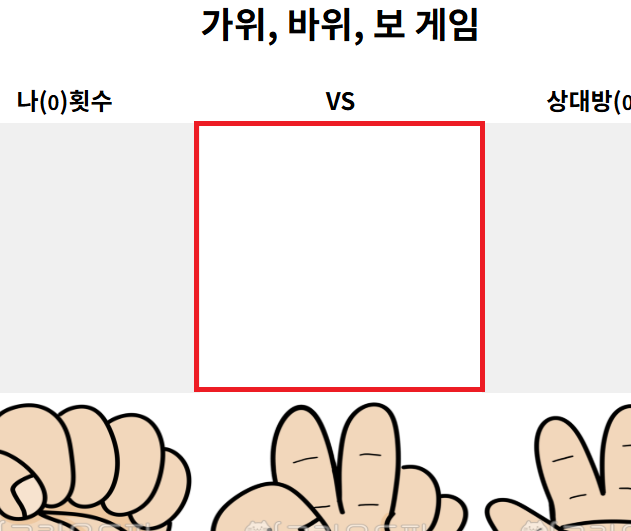
빨간 부분인데요
결과 동영상
동영상 서비스가 종료되어 해당 콘텐츠를 재생할 수 없습니다.